Showing posts with label grocerysurf 101. Show all posts

Monday, July 23, 2007

Grocerysurf 101 - Mobile recipe box

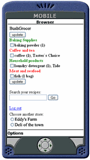
Do you have a cellphone? Does it have Internet access? If it does, welcome to join the club! From the past, We had introduced GrocerySurf mobile shopping list (read it). Mobile recipe box is an add-on feature for your mobile list. That means, not only the shopping list follows wherever you go, so does your recipe box!


The main idea here is to encourage people to cook more at home and enjoy healthy and balanced diet. Using the mobile recipe box ensures our users that one grocery trip does all. Best of all, if you spot a great buy at the store (ex. $0.99/lb Pork Baby Ribs), you can double check your recipe for associated ingredients.


The basic functions:

1. Search recipes by ingredient(s) or title(s).

2. The result is shown by relevance.

3. Click any single ingredient and add it into current shopping list.

4. Aisle is assigned automatically.

To learn more about using the GrocerySurf online grocery organizer, check these series of articles "GrocerySurf 101."

Saturday, July 7, 2007

Bogof ? 10/10? - Code list for store ads

Do you read store ads for weekly sale or seasonal specials?
If you do, you can make a code list based on the store ads. It can be input in the "Note" section in the GrocerySurf shopping list program.

Using code list saves you time when writing the shopping list. And it is especially helpful for the GrocerySurf mobile shopping list users since the screen is small.
Here is an example of code list:

bogof, buy one get one free
10/10, mix and match 10 items for $10
c+, with coupon
ST, store brand
sub/no, specific brand as mentioned (that is, no substitute)
sub/yes, can be any brand if out of stock
BB, the bigger the better!
r_label, read the label / check the expiration date

Well~ you got the idea! Create you own and keep it handy. Be sure to share the code list with your family members if you take turn to go shopping.

Thursday, June 7, 2007

GrocerySurf 101 - Family shopping list

Genie, one of the grocery surfers, sent us a tip for making family shopping list with GrocerySurf. And we would like to share it with all surfers.

To make a family shopping list, you can sign up an account and share the account within family members. This way they also have access to the shopping list without chasing you around and telling you what they need. They can even update the list at work or anywhere the Internet is available. How do you know which one is for whom? Write the person's name in the "note" section! For instance, "toothbrush, for Jeff" and "toothbrush, for Jammy" will be counted as seperate items in the program. In addition, GrocerySurf team member came up with another idea for family shopping list.


Since GrocerySurf program is able to make multiple-store shopping lists. Why not use the store tag and add all your family members as tags for seperate shopping list?

To add individual name in the store tag, go to "add store" page. There you will find a box to enter the store name. Instead of the store name, input family members' names. This way, everyone has a shopping list seperate, but you can transfer their items into one list before you head for the store. Please note: Make sure the list is empty before you make changes to the store name tag. You may lose the data if you add or delete store names.

It is always fun to receive creative ideas from grocery surfers. Let us know if you have any suggestions as well.

Tuesday, May 29, 2007

Why and How - use recipes wise to save money and time

I love cooking, and I believe the recipe is the most magical form of literature.

It used to be written down on a piece of paper, or given down through word of mouth. Nowadays, We get recipes from all kinds of sources: family, friends, magazines, websites, and even from a box of cereals. Some of them are lifetime treasures, and some of them are simply great. However, Some of them come with beautiful staged photos, and some of them come with the ingredients long enough to make a necktie.

As you already know, free recipe usually comes with a price unless it is from your own circle of trust! I ended up with a pantry full of ingredients that are rarely used and too painful to throw away. Time for a change, isn't it?

First of all, based on how much time I have, I get new recipe only once or twice a month from the Internet. To get the most use of the recipes, I use the "ingredient search" to narrow down the recipes that use the basic pantry items in my kitchen. If the recipe comes with one or two ingredients that are not the "regular" in my pantry, I either substitute or skip it - for example, instead of the Italian arborio rice, I use the jasmine rice from the nearby grocery store. And of course sometimes I have to add one or two new items into my shopping list in order to get it right.

After awhile, I have a handful of recipes that are "tested" in my kitchen and "reviewed" by my family. I, then, make a very general meal plan that uses this set of recipes as a combination; for example, the grilled chicken breast tied with French baguette, the bacon and egg breakfast come with the English muffin. I follow my flying mood everyday to cook whatever I want.

It should work as I wanted. But it didn't.

I would get the pork rib for grill but forgot about the marinate sauce. I would pick the beef chuck on sale but forgot to get the celery root to cook with. And writing down the ingredients again and again for every shopping trip is getting me crazy. The method needs to be refined.
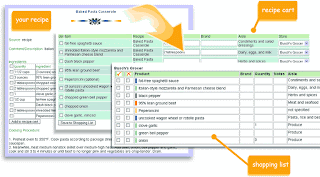

The recipe input is a key solution for this. It basically uses the recipes in the account and makes the household grocery shopping list combined with all the ingredients from recipes of my choice. I could add the ingredients from the recipe directly to my weekly shopping list. And the items are organized by aisles and stores all together in one list.

Sounds good? Not good enough. How about the surprising sale item found in the grocery shopping trip? How can I make sure that I get everything needed to cook with? Well~ we added the recipe search in the mobile phone. When I see the sale in the grocery store, I search recipe box to add items into current shopping list.

Thinking of the fuel saving and the nice meal on the table, it is the best reward for being a Grocery Surfer!

Grocerysurf 101 - Make shopping list

This is part of the series "Grocerysurf 101."
Let's start making grocery shopping list, the Grocery Surfer way.

1. Multi-store shopping list
Grocery chains often offer better price on general items, but they may not come with the quality you expect. If that is the case, check local farmers market for better vegetable and fruit selection, and local deli for better quality meat. Most people shop at 2 to 3 different grocery stores. GrocerySurf shopping list program allows you to make multiple lists for stores as many as you need. Take advantage of that, Surfers!

2. Smart input, input smart
Smart input, a set of common items, shows up as you type in the shopping list. You can click on the item name to input. If it is the first item on the smart input list, just click Enter to input. The smart input list actually grows as you use the GrocerySurf program. It remembers all the personal input from your list and minimize the repeated typing process. To avoid the bad input or so-called “spam”, we do not share each user’s smart input list.

3. Why choose aisle?
The list that is organized by aisle can keep shopping trip more efficient. It is especially helpful if the store is as big as supercenter. You can name your own aisle or even use aisle numbers. The program can sort the list by number as well. However, since grocery stores tend to move aisles around, we don't recommend using number system. If you choose NOT to use aisle, the items on the list will be listed under "not specified" in the pantry room, and everything else in the program still works such as auto-reminders and smart input.

Thursday, May 10, 2007

GrocerySurf 101 - Being a Grocery Surfer

GrocerySurf (what is it?) comes with three main parts: shopping list, reminder, and recipe box. Here is a simple guide to all grocerysurf users. To become a grocery surfer, you need to sign up an account. It takes less than a minute to complete, and it is free.

Basic

  1. choose store name(s)
  2. make shopping list by clicking the link “edit shopping list”
  3. when finished, save the list
  4. go shopping with your printable list or use your cell phone
  5. go to unload zone and update the pantry (Mobile list user can skip this part! The pantry is updated when you use the mobile list.)

Advanced

  1. keep recipes that are used regularly in GrocerySurf recipe box and make shopping list from recipes
  2. search through recipes on your cell phone in the store (find great savings in store? Don’t forget to get all the other ingredients you need to cook with it.)
  3. manually configure the reminder
  4. transfer grocery items from store to store
  5. print the pantry list and keep it on the refrigerator as a quick reference

Wanna more adventures? try these -

  1. use the recipe box as an event box (ex. name: birthday party, ingredients: balloons, cake mix, candies, invitation cards, etc…)
  2. share the account among family members, and edit the same shopping list together.
  3. become our panelists and help us improve the grocerysurf program. If you have more creative ideas to use grocerysurf program, share with all grocery surfers. Chances are, you will have fun!
Grocerysurf program learns from your shopping pattern and adjusts itself to fit your need. In other words, the more you use, the more accuracy and convenience you will have.